

Table of Contents
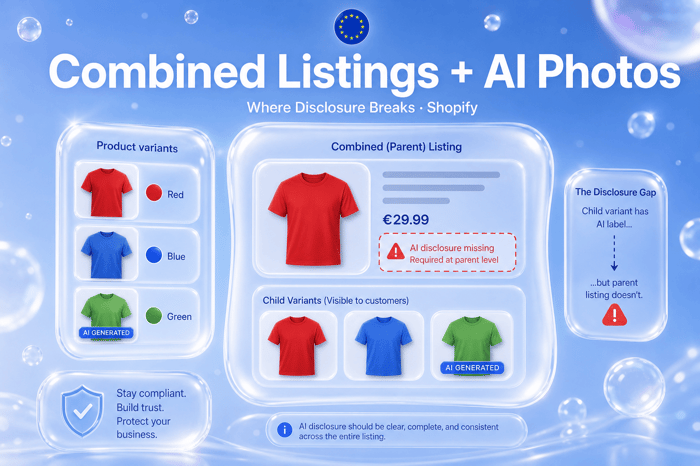
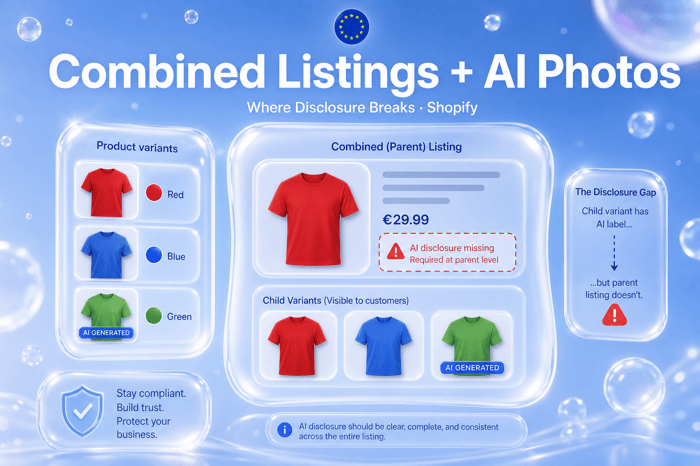
Shopify Combined Listings let merchants group separate products under one parent URL — colour swatches, style families, and split SKUs that share merchandising but keep independent inventory. It is a conversion feature. Under the EU AI Act Article 50, it is also a disclosure surface problem: AI-generated or AI-modified photos may live on child product records while shoppers land on a parent page, collection cards, or Google Shopping feeds that show unlabeled hero images.
If you use combined listings and AI product photography, you need a classification and overlay strategy that follows the image, not only the admin product you think is “canonical.”
Not legal advice. Article 50 scope depends on your content and markets. Confirm deployer obligations with counsel.
How combined listings change URL architecture
Traditional variants share one product URL. Combined listings link multiple product handles to a parent:
Parent URL — merchandising hub, swatches, shared SEO entry
Child products — separate SKUs, media galleries, inventory, sometimes separate PDP paths
Swatch selection — may swap featured image from child without full navigation
Theme and app code often assumed one product ID per PDP. Combined listings break that assumption.
Article 50 reminder for deployers
Regulation (EU) 2024/1689 Article 50(4)/(5) requires deployers to disclose AI-generated or materially AI-altered content in a clear, distinguishable, accessible way at first exposure. For product photos, that means visible labels on the image shoppers see — not policy pages alone.
Combined listings do not exempt you because the parent product’s default image was shot in a studio. If the swatch swap loads a synthetic render from a child SKU, that exposure needs disclosure when the shopper sees it.
Where disclosure gaps appear
| Surface | Gap | Why it fails Article 50 intent |
|---|---|---|
| Parent featured image | Real photo; child AI swatches unlabeled | First exposure on swap may be AI without label |
| Collection grid | Pulls child image without overlay app context | Card thumbnail is first exposure off PDP |
| Google Merchant Center feed | Child image_link with no burned-in label | Off-site first exposure in EU ads |
| Instagram / email | Deep link to parent; hero from child CDN URL | CDN URL may bypass theme embed |
| Quick buy / drawer cart | Mini image from variant selection | Smaller but still an image exposure |
| Marketplace sync apps | Sync child SKU media only | Channel-specific unlabeled assets |
Child vs parent: where to classify AI photos
Best practice for deployer governance:
Classify at the image asset level tied to the Shopify media ID on the product that owns it — usually the child if media lives there.
Propagate overlay rendering to any theme surface that displays that media ID, including parent swatch swaps.
Document in CSV audit trail which child SKUs carry AI imagery for agency handoffs.
Avoid parent-only classification when only children use generative backgrounds or synthetic models.
Apps that classify only the parent product record miss child gallery images. Apps that overlay by media URL or product-media relationship survive combined listings better.
Feeds and off-store channels
Theme app extensions fix on-site rendering. They do not travel with raw CDN URLs in:
Google Shopping supplemental feeds
Meta catalogues
Affiliate APIs
Email templates using
{{ product.featured_image }}without overlay
For EU-facing campaigns, burned-in labels on exported assets (via tools like EU AI Icon) or feed-specific labeled copies may be necessary. See FAQ on metadata vs visible labels.
Swatches and theme behaviour
Themes implement combined listing swatches differently:
Some replace parent gallery via JavaScript when swatch clicked
Some navigate to child handle URL
Some lazy-load child media into DOM without full page reload
QA checklist for merchants:
Click every swatch on parent PDP; verify AI labels appear on each AI image
Test mobile and desktop; label position must stay readable
Test with sale badges and “New” stickers — CoP guidance prefers labels clear of promo clutter
Retest after theme update (combined listings are theme-sensitive)
Where EU AI Label fits (light touch)
EU AI Label classifies product media in admin and renders overlays via theme app extension on storefront surfaces that load labeled media. For combined listings:
Classify AI images on each child product that owns the media
Enable app embed on production theme
Export labeled assets for feeds where overlays do not apply
Use Compliance Hub at
/pages/ai-transparencyfor deployer narrative across a complex catalog
EU AI Label does not replace legal scoping. It supports declaration-first workflows described in Shopify AI Act checklist.
AI-generated vs AI-modified across variants
Colourway campaigns often mix:
Studio hero (not AI) on parent
Generative flat-lay per colour on children
AI background swap on lifestyle shots (modified, not fully generated)
Article 50 and Code of Practice guidance distinguish generated vs materially manipulated content. Your classification should reflect that per image, not one badge for the whole combined family.
FAQ
Do combined listings change my Article 50 deadline?
No. Deployer transparency applies from 2 August 2026 for in-scope AI visuals regardless of Shopify product architecture.
If only one child colour uses AI, must the parent page disclose?
When a shopper can expose that image via swatch or navigation, treat it as in-scope exposure. Label the AI image, not the whole parent product blindly.
Will Google Merchant Center accept overlaid product images?
Policies vary by program and claim type. Some merchants use separate labeled feed assets. Test in Merchant Center diagnostics.
Does combined listings affect GPSR or PPWR?
Different laws. GPSR safety info and PPWR packaging attach to the product placed on market — often each child SKU. AI disclosure attaches to the image exposure.
How do I install EU AI Label on a combined listing store?
Install guide and pricing by active labeled photos.
Next steps
Map every child product in combined families that uses AI imagery. QA swatch swaps and feed URLs for unlabeled first exposure. Combined listings optimize merchandising; Article 50 requires disclosure that follows the image across those paths.
EU AI Label supports transparency workflows under Regulation (EU) 2024/1689 Article 50. It is not legal advice and does not guarantee compliance.